Features & Capabilities

A deep dive into everything StruxDraft can do — from 12 structural member types and three code engines to beta AutoFrame, customizable material databases, and professional markup tools.

Structural Elements

12 structural member types covering wood-frame, steel, concrete, and geotechnical construction. Each element type can be drawn directly on the plan and receives real-time code checks.

Element Placement Materials Key Properties
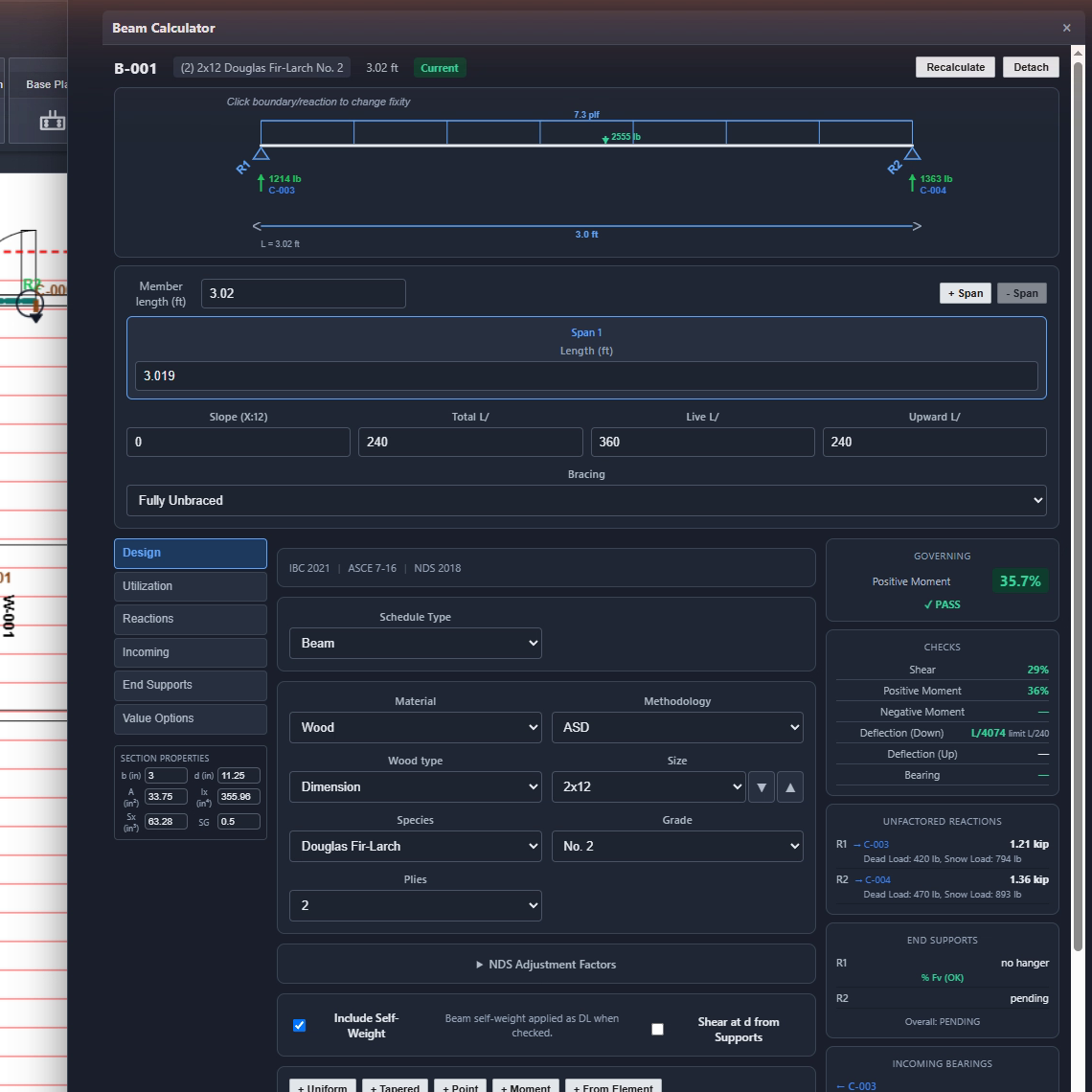
Beam Drag-to-create line DIM, GLB, LVL, PSL Size, span, overhang L/R, multi-span (1–2), roof slope, partial-span loads, point loads
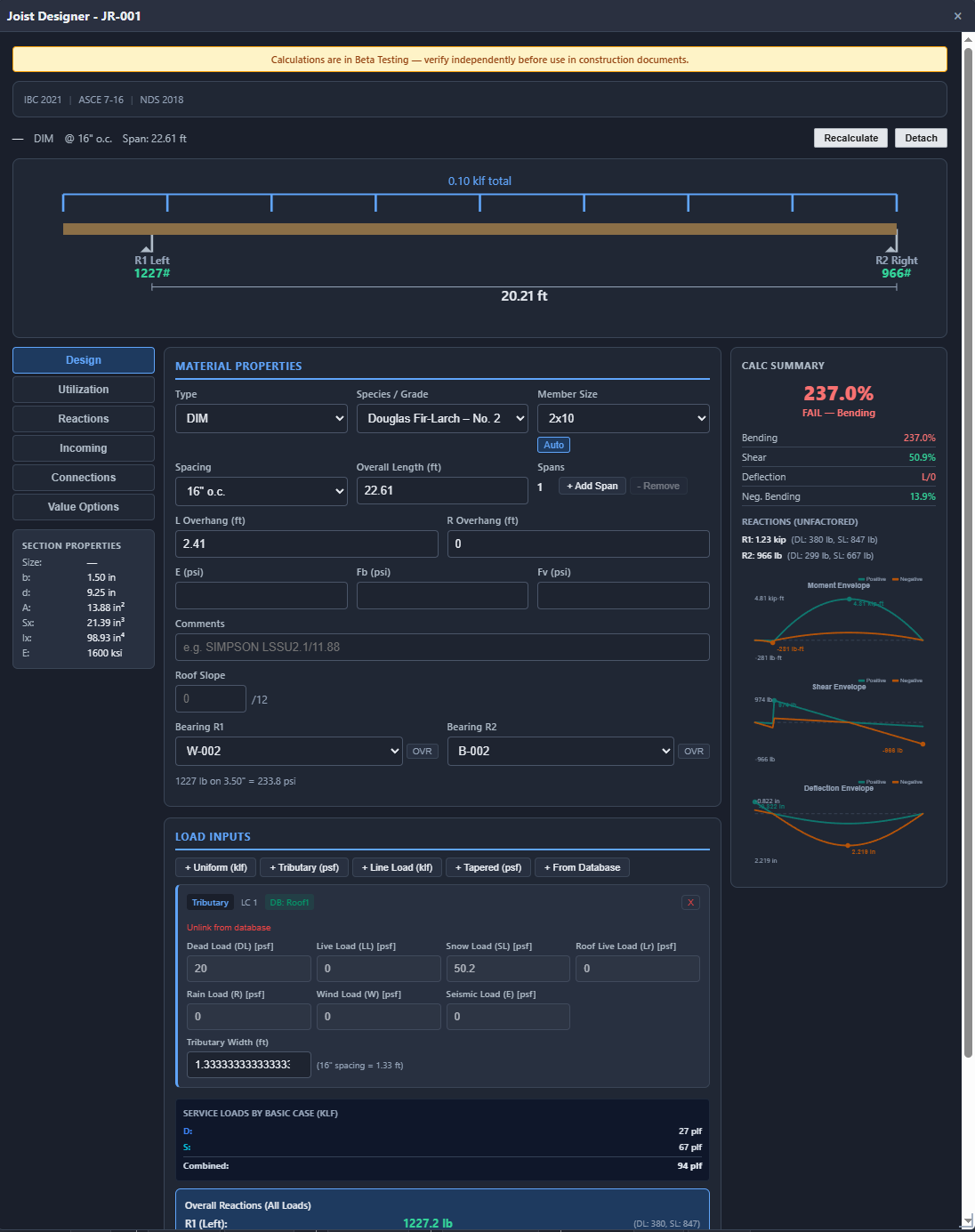
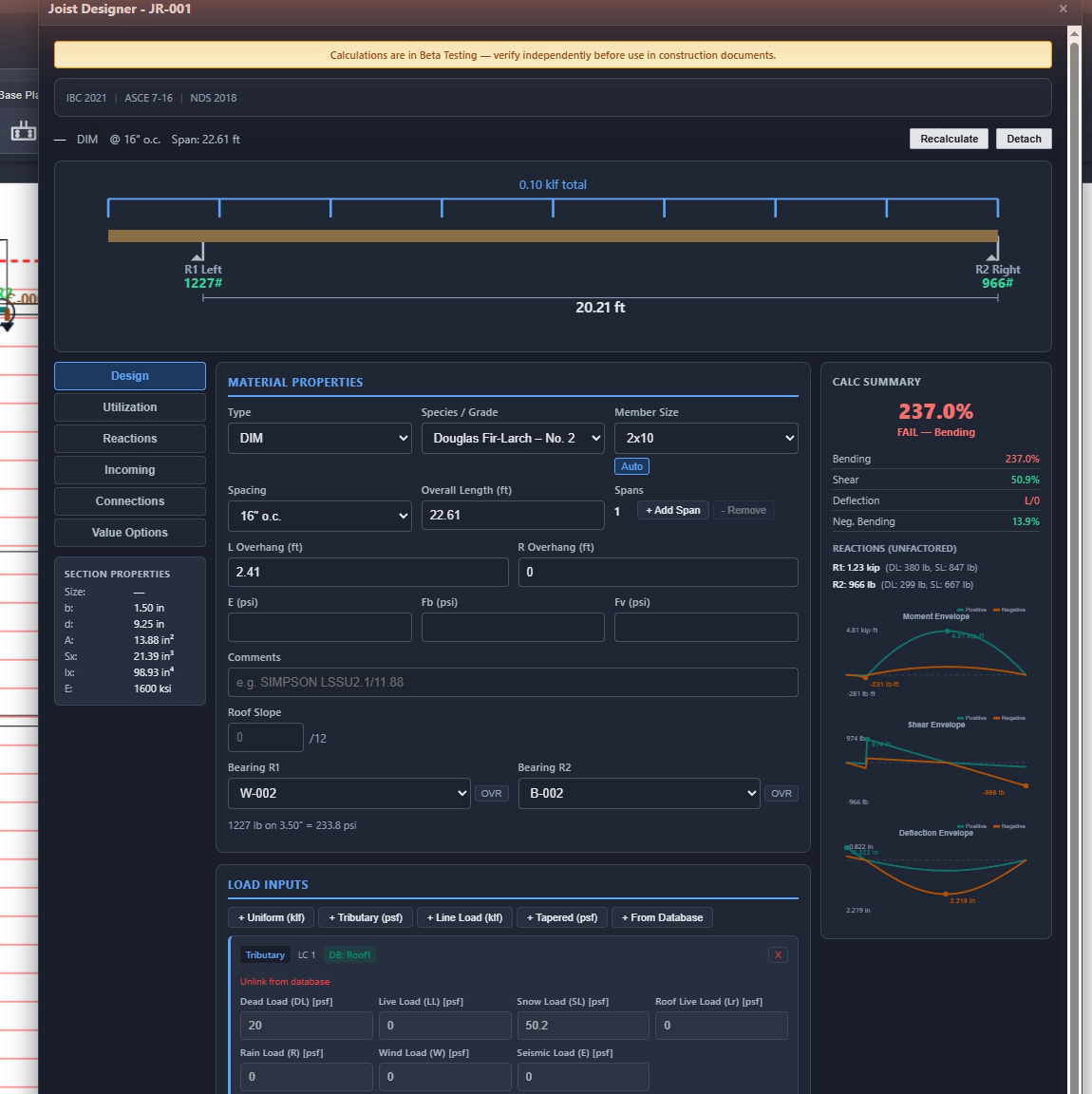
Joist Rectangular or polygon region DIM, LVL, TJI Size, spacing (12/16/19.2/24″), custom angle, overhang, multi-span, tributary width
Header Drag-to-create line DIM, GLB, LVL Size, span, trimmer stud (size + qty), king stud (size + qty)
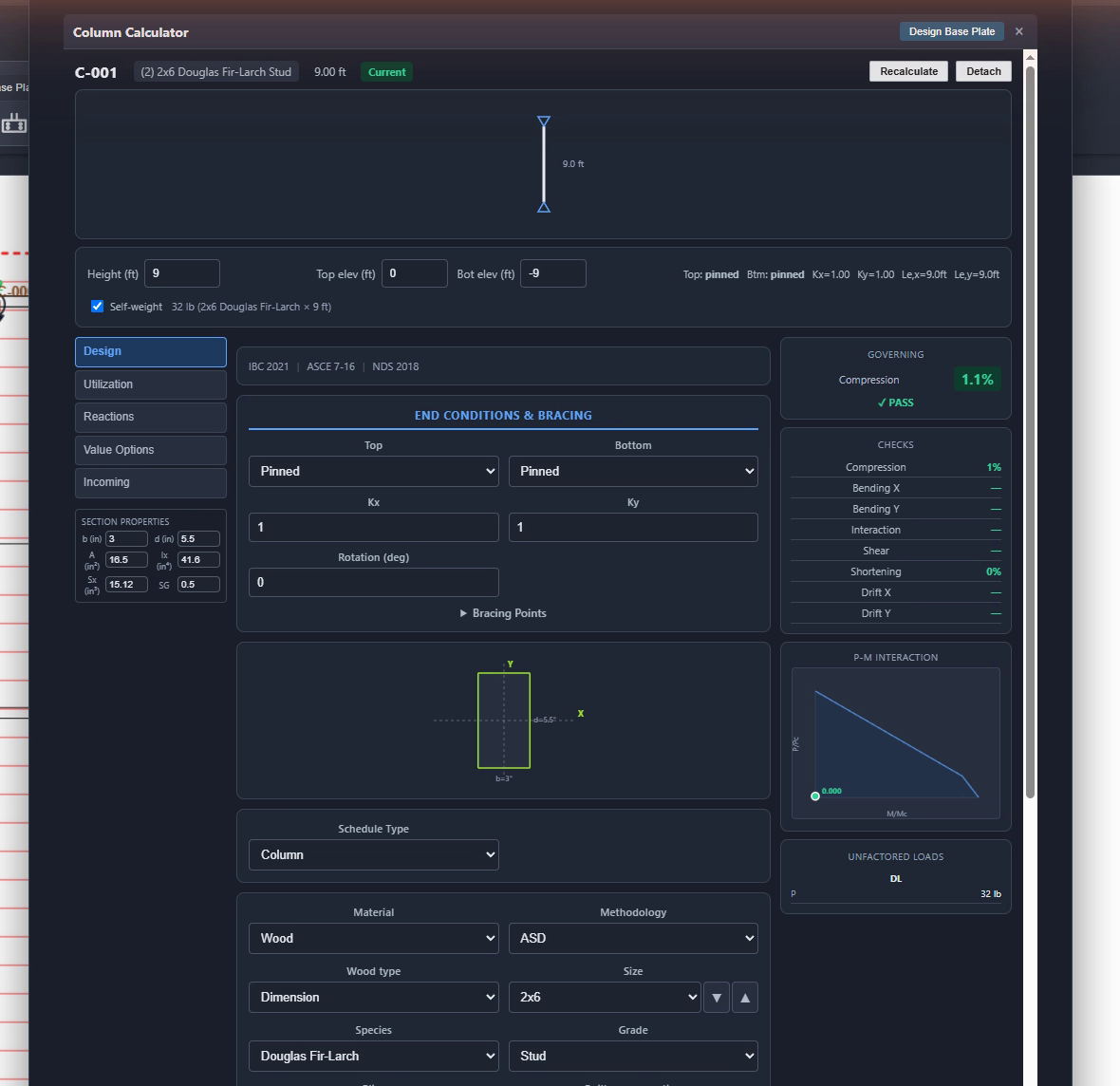
Column Click to place DIM, GLB, LVL, PSL Size, height, stack type, tributary area, auto-place at beam ends
Load-Bearing Wall Drag-to-create line DIM (studs) Stud size (2×4/2×6), spacing, wall height, stack type
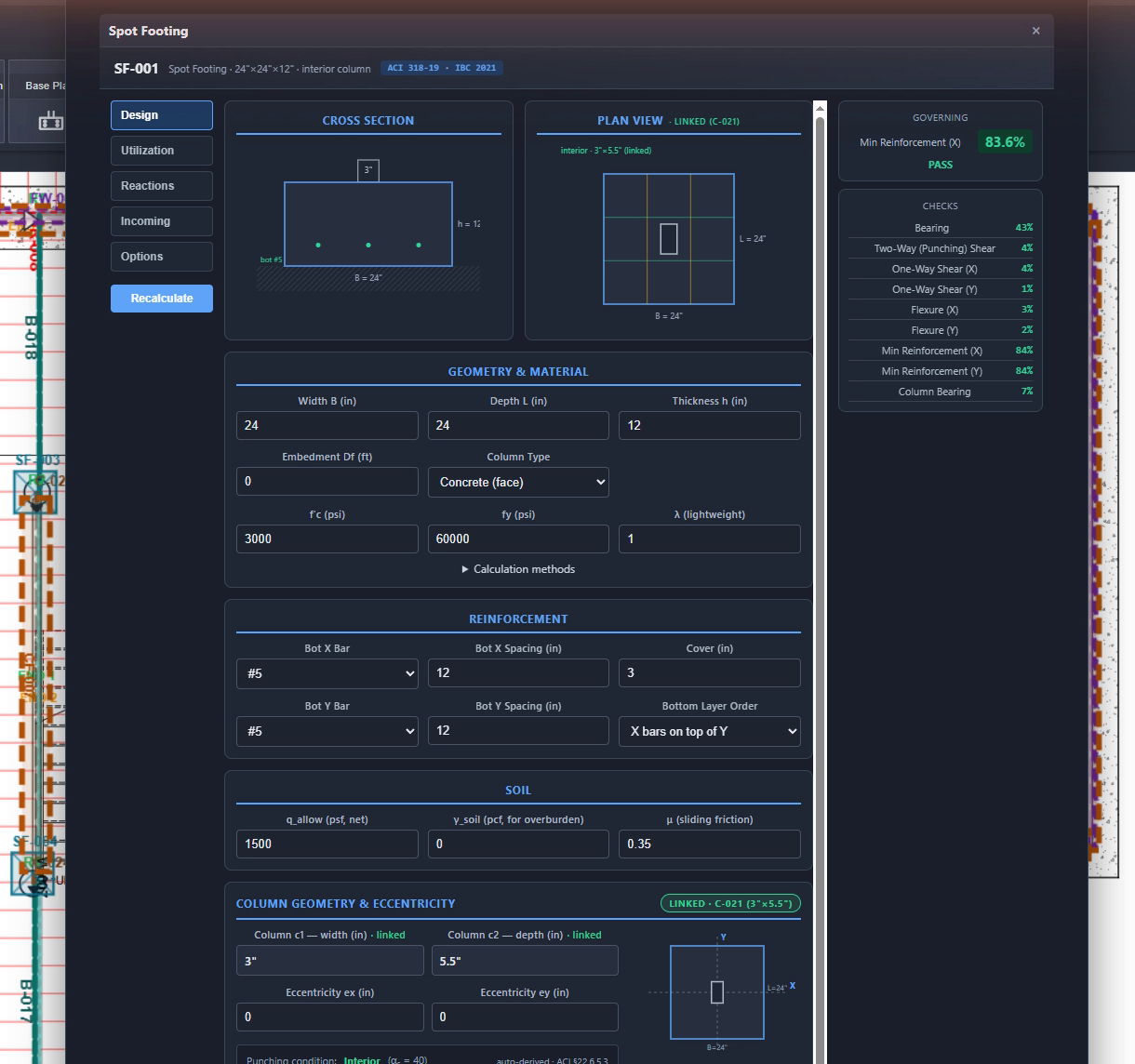
Spot Footing Click to place Concrete Width × Length × Thickness, f'c, fy, rebar X & Y, bar size #3–#11
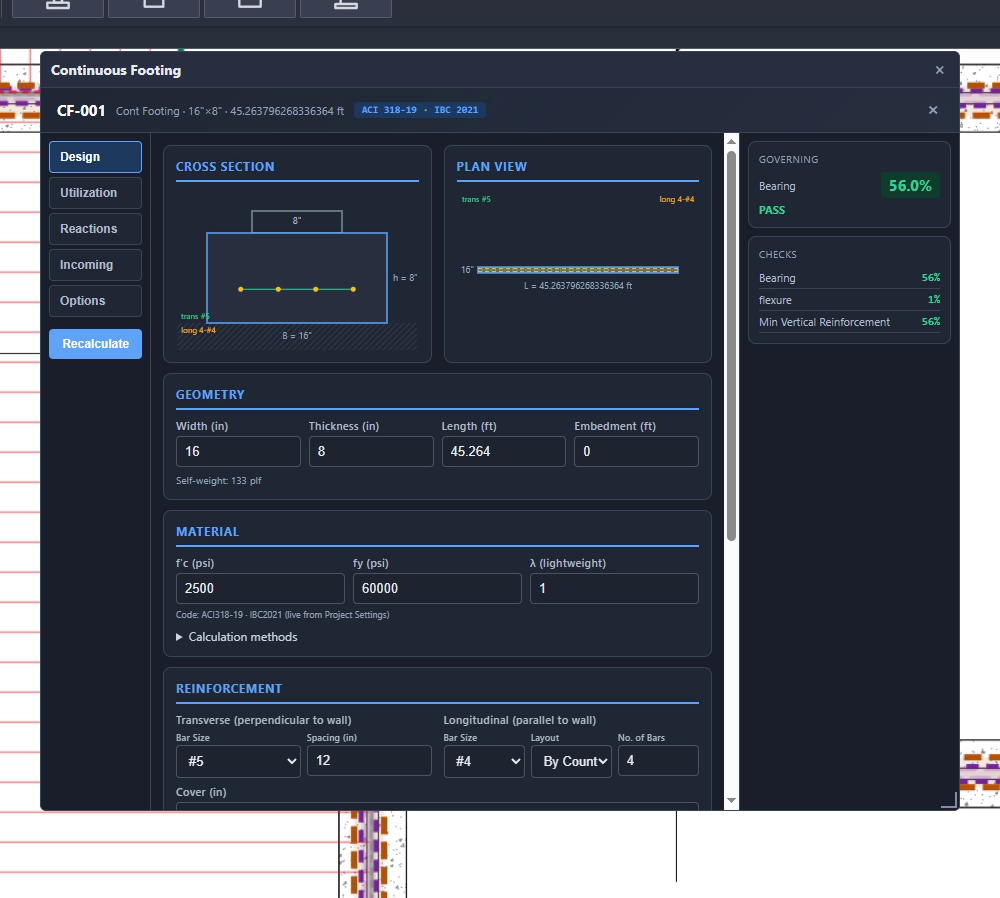
Continuous Footing Drag-to-create line Concrete Width, thickness, f'c, q_allow, wall thickness on footing
Pier Click to place Concrete Square/round, width, depth, height, f'c, rebar, ties, k-factor
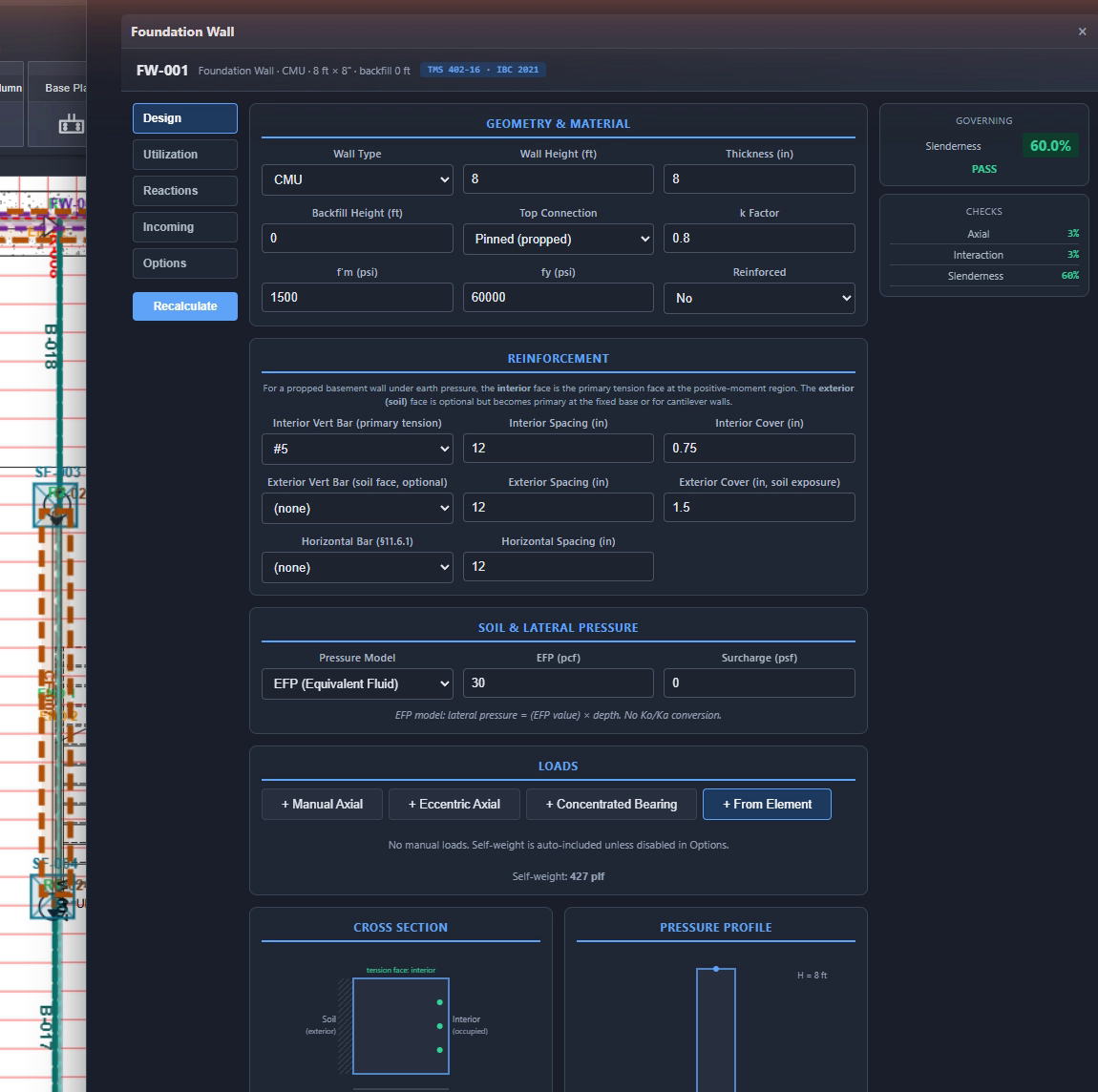
Foundation Wall Drag-to-create line CMU, Concrete, ICF Type, thickness, height, backfill height, soil density, f'm
Steel Beam Drag-to-create line W-Shapes, HSS AISC section, grade (A992, A500 Gr. B/C, A36), multi-span, overhangs, partial loads, point loads, Cb lateral bracing, LRFD & ASD
Steel Column Click to place W-Shapes, HSS AISC section, height, K-factor, Euler buckling (Fe), AISC 360 axial compression, auto-place at steel beam endpoints, rotatable cross-section
Retaining Wall Click to place Concrete (cast-in-place) Stem height & taper, toe/heel length, base thickness, shear key, backfill slope (β), surcharge, passive pressure, stem/toe/heel rebar, ACI 318-19 strength & ASD stability
Anchor Bolt Click to place Steel Diameter (3/8″–1″), length, spacing, embedment depth

Annotations, Markup & Measurement

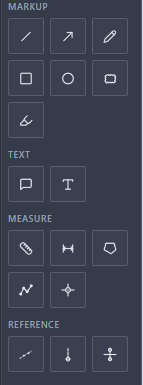
13 annotation and measurement tools for communicating your design intent, verifying dimensions, and marking up plans like a pro.

Line & Arrow

Straight lines and directional arrows with adjustable stroke width and color. Use arrows to highlight load paths, call out specific conditions, or indicate force directions.

Pencil (Freehand)

Freehand drawing on the canvas — sketch quick notes, circle problem areas, or mark up conditions that don't fit a geometric shape. Pressure-sensitive width supported.

Circle & Rectangle

Geometric shapes with optional fill color and opacity control. Great for highlighting areas of concern, marking exclusion zones, or calling attention to plan regions. Rectangle annotations can also act as whiteout blocks.

Highlighter

Semi-transparent overlay rectangles with adjustable opacity (default 28%). Highlight bearing walls, shear panels, or any plan region without obscuring the drawing underneath.

Callout

Text box with a leader arrow pointing to a specific feature. Resizable box width, editable text via double-click, and configurable font size. The go-to annotation for keynotes, special conditions, and engineering notes on the plans.

Textbox

Free-floating text with configurable font size, color, bold/italic, and optional whiteout background. Double-click to edit inline. Use for titles, general notes, or any text that doesn't need a pointer.

Section Callout

Section cut line with a bubble annotation — shows top/bottom text labels (section ID / sheet reference) inside a circle at the line endpoint. Standard structural drawing convention for section references.

Span Annotation

Dimension-style span indicator with automatic length labeling from the drawing scale. Useful for marking clear spans, tributary widths, or opening dimensions.

Measurement Tools

Linear Measure

Persistent dimension line with tick marks and auto-calculated length based on your drawing scale. Saved with the project — click to edit length. Supports both imperial (ft-in) and metric display.

Polyline Measure

Multi-segment measurement tool — click to define vertices and measure complex paths. Shows per-segment lengths and a total accumulated length label. Perfect for measuring irregular wall runs or pipe routes.

Area Measure

Click to define a polygon, and StruxDraft calculates the enclosed area using the shoelace formula. Shows area in SF (or m²) and perimeter length. Essential for tributary area calculations, room areas, or footing plan dimensions.

Quick Measure

Temporary measurement line (Ctrl+Q) for checking distances on the fly. Shows the scaled measurement in real-time but isn't saved with the project — disappears when you switch tools.

Wood Design — NDS 2018 ASD

Full NDS 2018 Allowable Stress Design with ASCE 7-22 load combinations.

Matrix Stiffness Beam Analysis

Continuous beam solver supporting simple span, 2-span, and cantilever configurations. Handles uniform, partial-span, and point loads with Gaussian elimination for the stiffness matrix.

Bending Check (NDS §3.3)

fb = M/Sx ≤ F'b with all applicable adjustment factors: CD, CM, Ct, CL, CF, Ci, Cr. Governs for the worst-case load combination automatically.

Shear Check (NDS §3.4)

fv = 1.5V/(b·d) ≤ F'v. Multi-span beams apply a 1.25× shear amplification factor for interior support reactions.

Deflection Check (IBC 1604.3)

Live load deflection ≤ L/360, total load ≤ L/240 (both configurable). Computed for each load combination independently.

Bearing Check (NDS §3.10)

fc_perp = R/(b·lb) ≤ Fc_perp at R1 and R2 support locations. Checks bearing perpendicular to grain at each reaction point.

Column Stability (NDS §3.7.1)

Full Cp calculation with Euler buckling (FcE = 0.822·Emin/(Le/d)²), slenderness ratio, and combined compression check. Includes axial shortening serviceability (L/500).

NDS Adjustment Factors

FactorSymbolDescription
Load DurationCDAdjusts for load duration: 0.90 (D), 1.00 (D+L), 1.15 (D+S), 1.25 (D+.75L+.75S)
Wet ServiceCMReduction for moisture content above 19%
TemperatureCtReduction for sustained elevated temperatures
Beam StabilityCLLateral torsional buckling factor
Size FactorCFDepth-based adjustment for sawn lumber (NDS Table 4A/4B)
IncisingCiFor preservative-treated incised lumber
Repetitive MemberCr1.15 for joists/rafters spaced ≤ 24″ o.c.
Column StabilityCpNDS Eq. 3.7-1 with buckling interaction

Steel Design — AISC 360

Full AISC 360-16 design for W-shapes and HSS sections with both LRFD and ASD methodology.

Steel Beam Analysis

Matrix stiffness beam analysis with multi-span, overhangs, and combined loading. Handles uniform, partial-span, point loads with DL/LL/SL disaggregation — the same solver powering wood beams, adapted for steel LRFD and ASD.

Flexural Strength (Ch. F)

Lateral-torsional buckling with Cb moment gradient factor. Computes Lp, Lr, and classifies the unbraced length to determine φMn (LRFD) and Mn/Ω (ASD). Covers compact, non-compact, and slender flange cases.

Shear Strength (Ch. G)

Web shear check: φVn = 0.6 × Fy × Aw × Cv1. Computes h/tw ratio and Cv1 coefficient per AISC G2. Reports ASD and LRFD shear utilization side by side.

Deflection Check

Service-level deflection computed separately for DL, LL, and SL. Standard limits L/360 (LL) and L/240 (TL) — both configurable. Reports governing deflection utilization ratio.

Steel Column (AISC Ch. E)

Full axial compression check: computes KL/r slenderness, Euler buckling stress (Fe = π²E/(KL/r)²), critical stress (Fcr), and nominal strength (Pn). Both LRFD (φPn) and ASD (Pn/Ω) simultaneously. Supports W-shape and HSS columns with rendered cross-section on canvas.

Steel Grades & Sections

Full AISC database: A992 W-shapes (W4–W14+), A500 Gr. B/C HSS (rectangular and round), A36 plate/angle. Each section includes d, bf, tf, tw, A, Ix, Sx, Zx, rx, Iy, Sy, Zy, ry — all properties needed for design.

Steel Load Combinations

MethodCombinations (Gravity)
LRFD (ASCE 7-22 §2.3)1.4D  |  1.2D+1.6L+0.5S  |  1.2D+1.6S+L  |  1.2D+1.6Lr+L
ASD (ASCE 7-22 §2.4)D  |  D+L  |  D+S  |  D+0.75L+0.75S  |  D+L+S

Concrete Design — ACI 318-19

Strength design (LRFD) for footings, piers, and foundation walls per ACI 318-19.

Spot Footing — 10 Checks

Applied loads, effective depths, soil bearing, two-way punching shear (3 ACI criteria), one-way shear (X & Y), flexural design with Whitney stress block, minimum reinforcement, max bar spacing, development length, and column bearing transfer.

Continuous Footing

Soil bearing check (q = w/B_ft ≤ q_allow) and one-way shear per ACI §22.5. Width, thickness, and reinforcement design for strip footings under walls.

Pier Design — 7+ Checks

Soil bearing, axial compression (tied/spiral), slenderness classification, shear, tie requirements, longitudinal steel limits, and P-M interaction. Cross-section SVG with rebar layout.

Foundation Wall

Axial stress (fa = P·12/Ag), lateral earth pressure (p = γ·H), bending stress, and combined unity check (fa/Fa + fb/Fb ≤ 1.0). Supports CMU, concrete, and ICF walls.

ACI Load Combinations

LRFD per ACI §5.3: 1.4D, 1.2D+1.6L+0.5S, 1.2D+1.6S+L, 1.2D+1.6S+0.5L. Governing Pu/Mu automatically identified.

Rebar Database

Full bar database #3 through #11 with diameter and area. Development length calculation per ACI §25.4.2 with ψ_t, ψ_e, ψ_s, ψ_g factors and As_reqd/As_prov reduction.

Retaining Wall Design

Concrete cantilever retaining wall analysis combining ASD stability checks with ACI 318-19 LRFD strength design.

Earth Pressure (Rankine/Coulomb)

Active earth pressure: Ka = tan²(45° − φ/2) for level backfill, with Coulomb adjustment for sloped backfill (β angle). Passive pressure optional with user-defined depth. Surcharge loads supported as uniform lateral pressure.

Overturning Stability

Resisting moments (soil weight, concrete weight, surcharge) vs. overturning moments (active earth pressure, surcharge lateral). Safety factor ≥ 1.5 required. Reports eccentricity and middle-third check.

Sliding Stability

Friction resistance (μ × vertical forces) plus passive pressure vs. horizontal driving forces. Safety factor ≥ 1.5. Optional shear key for additional resistance.

Bearing Pressure

Meyerhof distribution: q_toe and q_heel computed from eccentricity. Checks q_max ≤ q_allow. Trapezoidal or triangular pressure distribution depending on resultant location.

ACI 318-19 Stem Design

Stem treated as vertical cantilever: computes Mu and Vu at base. φMn from Whitney stress block with user-specified bar and spacing. φVn per ACI one-way shear. Minimum reinforcement per ACI §11.6.1 (wall vertical/horizontal).

ACI 318-19 Toe & Heel

Toe: cantilever from stem face, net upward soil pressure. Heel: cantilever with soil weight + surcharge down minus soil pressure up. Flexure and shear checks with As_min per ACI §24.4.3.2 (T&S reinforcement).

Retaining Wall Geometry Parameters

ParameterRangeDescription
Stem HeightCustom (in)Height of stem above base slab
Stem ThicknessTop & Bottom (in)Tapered or constant stem width
Toe / Heel LengthCustom (in)Base slab extensions front and back
Base ThicknessCustom (in)Foundation slab depth
Shear KeyDepth & Width (in)Optional key for sliding resistance
Backfill Slopeβ (degrees)Sloped backfill above retained height
Soil Propertiesγ, φ, μ, q_allowUnit weight, friction angle, base friction coeff, bearing capacity
ReinforcementStem, Toe, Heel barsBar size (#3–#11) and spacing (in) per location, with horizontal and rear T&S bars

Material & Connector Libraries

Built-in databases with hundreds of sections and connectors — and a fully customizable database system that lets you add your own materials, grades, sections, and load combinations.

LibraryCountDetails
Dimensional Lumber18 sections2×2 through 8×12 — depth, width, area, Ix, Sx per NDS Table 1B
Species & Grades31 combos7 species × up to 5 grades — Fb, Ft, Fv, Fc_perp, Fc, E, Emin
Glulam (GLB)23 sections3-1/8″, 5-1/8″, 6-3/4″ widths, 6″–18″ depths, 24F-V4
LVL31 sectionsSingle through quad ply, 7-1/4″–18″ depths
TJI I-Joists14 sectionsTJI-110 through TJI-560, 9-1/2″–16″ depths
PSL6 sections3-1/2×3-1/2 through 7×7
Steel W-ShapesFull AISC databaseAll W-shapes with section properties
Steel HSSFull AISC databaseRectangular and round HSS sections
Simpson Hangers72+ modelsLUS, HUS, LU/GLT, HU, MIT/DERA families with Fv, Fl, Fu
Simpson Hold-DownsCatalogHold-down connector capacities

Customizable Database System

Every material library in StruxDraft is backed by a structured CSV database system with default and user tiers. You can add, modify, or override any material, grade, section, or load combination.

15 Database Tables

Materials, wood grades, steel grades, masonry grades, concrete grades, wood shapes, steel shapes, masonry shapes, concrete shapes, hanger connectors, hold-down connectors, load combinations, governing codes, material standards, and unit conversions.

User Override Layer

Every default dataset has a matching user CSV file. Add rows to the user file to extend the library — your entries are merged by ID and take precedence over defaults. Never lose your customizations on an update.

Runtime Overrides

Override any dataset at runtime via localStorage — perfect for project-specific material properties, custom load combination sets, or regional masonry grades. Reset to defaults with one click.

Custom Load Combination Sets

Define your own load combination sets in the database: set DL, LL, SL, Lr, R factors and CD values. Switch between ASD and LRFD combo sets per project. The calc engine uses your custom combos automatically when a set key is assigned.

Schedules & Reports

From live editing to print-ready calculation packages.

Live Schedule Panel

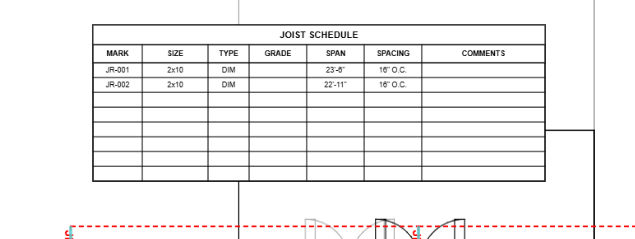
8 collapsible schedule groups in the right sidebar: Beam, Joist, Header, Column, Wall, Footing, Foundation Wall/Pier, Anchor Bolt, and Keynotes. Every property is inline-editable with real-time utilization badges.

Canvas Schedule Rendering

Schedule tables render directly onto the Konva canvas, visible alongside your structural annotations on each drawing sheet.

Calculation Report

Comprehensive structural calc document: title block, summary statistics, design criteria, member-by-member BeamCards/ColumnCards/JoistCards with every code check, reactions, and utilization — ready for plan review submittal.

"Similar To" Grouping

Link identical members to a parent — they share engineering properties and appear in the schedule with "SIM" designation. Keeps schedules clean when you have many identical members.

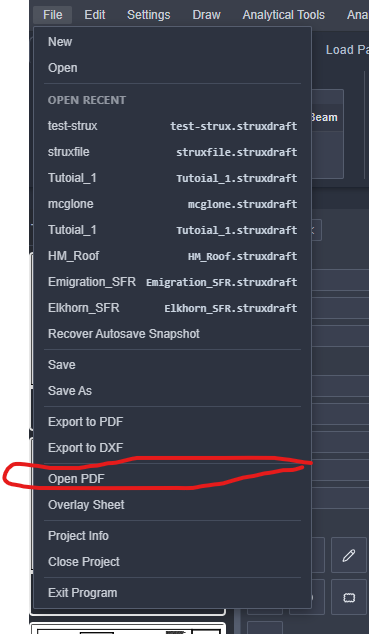
PDF Export

Multi-page PDF export at 2× resolution via jsPDF. Includes all structural elements, annotations, and schedule tables per page — print-ready for plan check submittals.

DXF Export

Export all structural elements to DXF format with organized layers (beams, columns, walls, joists, footings, annotations). Coordinates convert through your drawing scale for accurate real-world dimensions in AutoCAD or any CAD software.

Project Save/Load

Save/load as .sdp (JSON) files via native OS file dialogs (Tauri). Import elements from other .sdp project files. Browser fallback with File API.

Hold-Down Schedule

Dedicated hold-down schedule for shear wall connections. Select Simpson hold-down models from the built-in catalog with allowable tension, anchor bolt, and fastener specifications.

Wall Highlighter & Architectural Stripping

Isolate structural walls from architectural clutter — see only what matters for your engineering analysis.

Highlight Walls, Hide the Noise

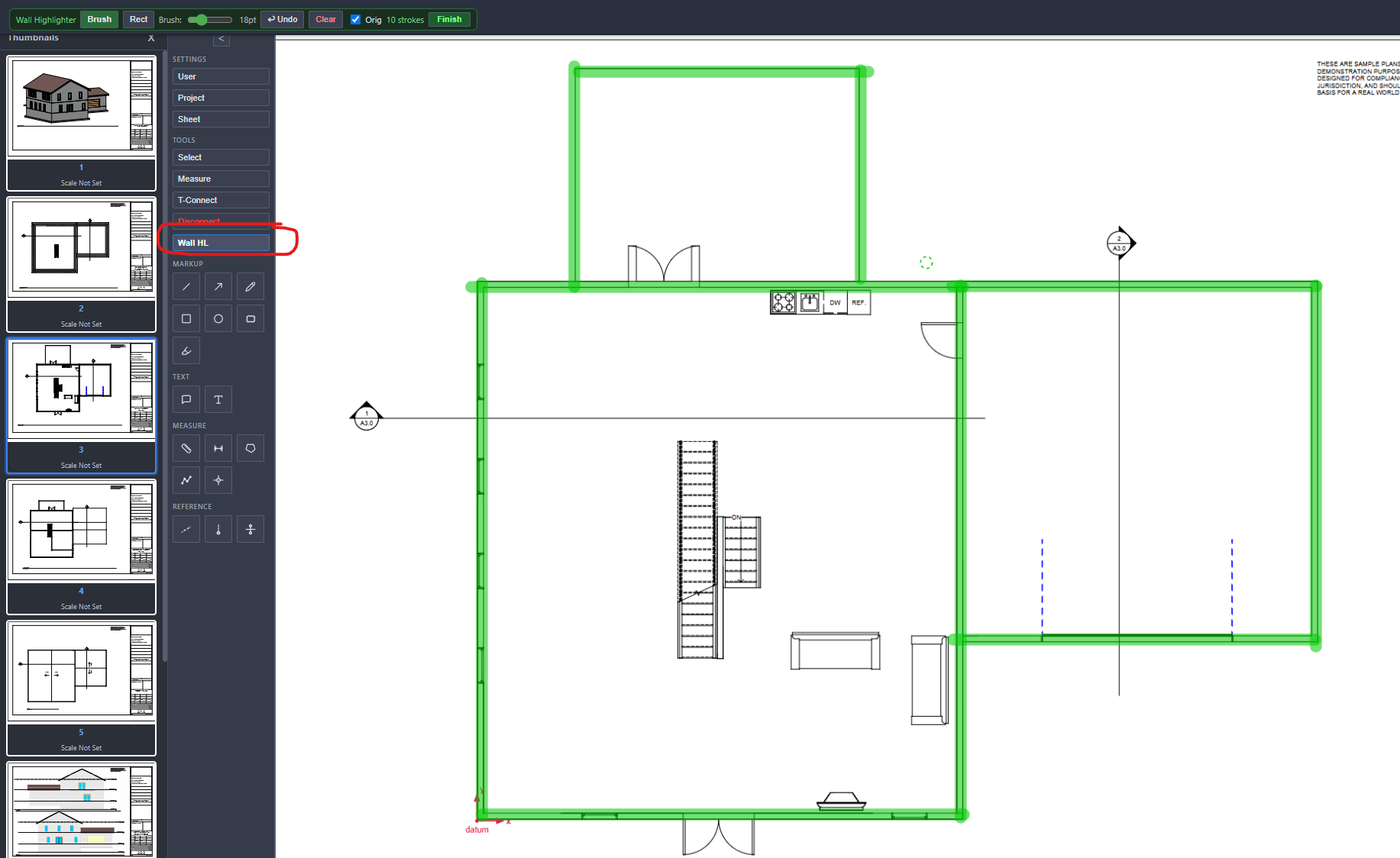
The Wall Highlighter tool lets you paint keep/remove strokes directly on the PDF. Highlighted areas preserve wall lines while stripping away furniture, fixtures, room labels, hatching, and other architectural noise that clutters your view.

Layer-Based Stripping

For layered PDFs (OCG), StruxDraft detects PDF layers and auto-selects architectural layers (furniture, plumbing, electrical, HVAC) for removal — preserving walls, dimensions, and structural layers. One-click "Auto-Select" picks the right layers automatically.

Wall Centerline Extraction

Under the hood, the strip pipeline performs binarization (Otsu threshold), morphological cleanup, Zhang-Suen skeletonization, and polyline tracing to extract wall centerlines — which can be exported to DXF for use in CAD software.

DXF Wall Export

Export extracted wall centerlines as a DXF file on a dedicated WALL_CENTERLINES layer. Coordinates are converted from pixel space to real-world inches using your drawing scale. Ready for import into AutoCAD, Revit, or any CAD tool.

AutoFrame BETA

Automatic structural framing from wall geometry — detect rooms, lay out joists, place beams, and size all members in one click.

Wall Graph & Room Detection

AutoFrame builds a graph from your wall segments, clusters endpoints with adaptive tolerance, and uses planar face extraction (most-left-turn algorithm) to detect enclosed rooms. Room classification uses annotation text and area heuristics.

Automatic Joist Layout

For each detected room, AutoFrame determines the optimal joist direction (perpendicular to the short dimension), sets spacing (12/16/19.2/24″ o.c.), and identifies bearing walls. Pre-computed span tables (NDS-derived) guide initial sizing before full analysis.

Beam Placement

When a joist span exceeds the allowable limit for the chosen size, AutoFrame automatically subdivides the room with beams. Beam lines are clipped to room polygon boundaries and dimensioned using your drawing scale.

Header Detection

Identifies gaps between collinear wall segments and creates header elements across the openings. Classifies opening width for appropriate header sizing — windows, doors, and garage openings all handled automatically.

Iterative Member Sizing

After framing layout, AutoFrame iterates through candidate sizes (DIM, LVL, TJI for joists; DIM, LVL, GLB for beams) using the full NDS calc engine to find the lightest passing member. Checks bending, shear, and deflection for each candidate.

Configurable Options

Control joist spacing, preferred member types, beam ply count, species/grade, starting tag numbers, and which rooms to include. Per-room overrides let you set custom live loads or room types. Exclude rooms you want to frame manually.

Drawing & Editing Tools

CAD-like tools designed for structural drafting — from element placement to markup to measurement.

ToolShortcutDescription
Select / MoveClick to select, drag to move, Shift+click multi-select, marquee box selection
BeamCtrl+BDrag-to-create with Shift-snap to horizontal/vertical
Steel BeamDrag-to-create; picks from AISC W-shape or HSS catalog
WallCtrl+WDrag-to-create with Shift-snap; auto-detects angle
Joist (Rect)Ctrl+JDrag-to-create rectangular joist region
Joist (Polygon)Ctrl+SClick vertices to define polygon joist region
ColumnCtrl+RClick to place; auto-places at beam/steel beam endpoints
Steel ColumnClick to place W-shape or HSS column with rendered cross-section
HeaderCtrl+EDrag-to-create with Shift-snap; trimmer + king stud config
Retaining WallClick to place with full stem/base/rebar configuration
Spot FootingClick to place; full ACI 318 two-way and one-way shear checks
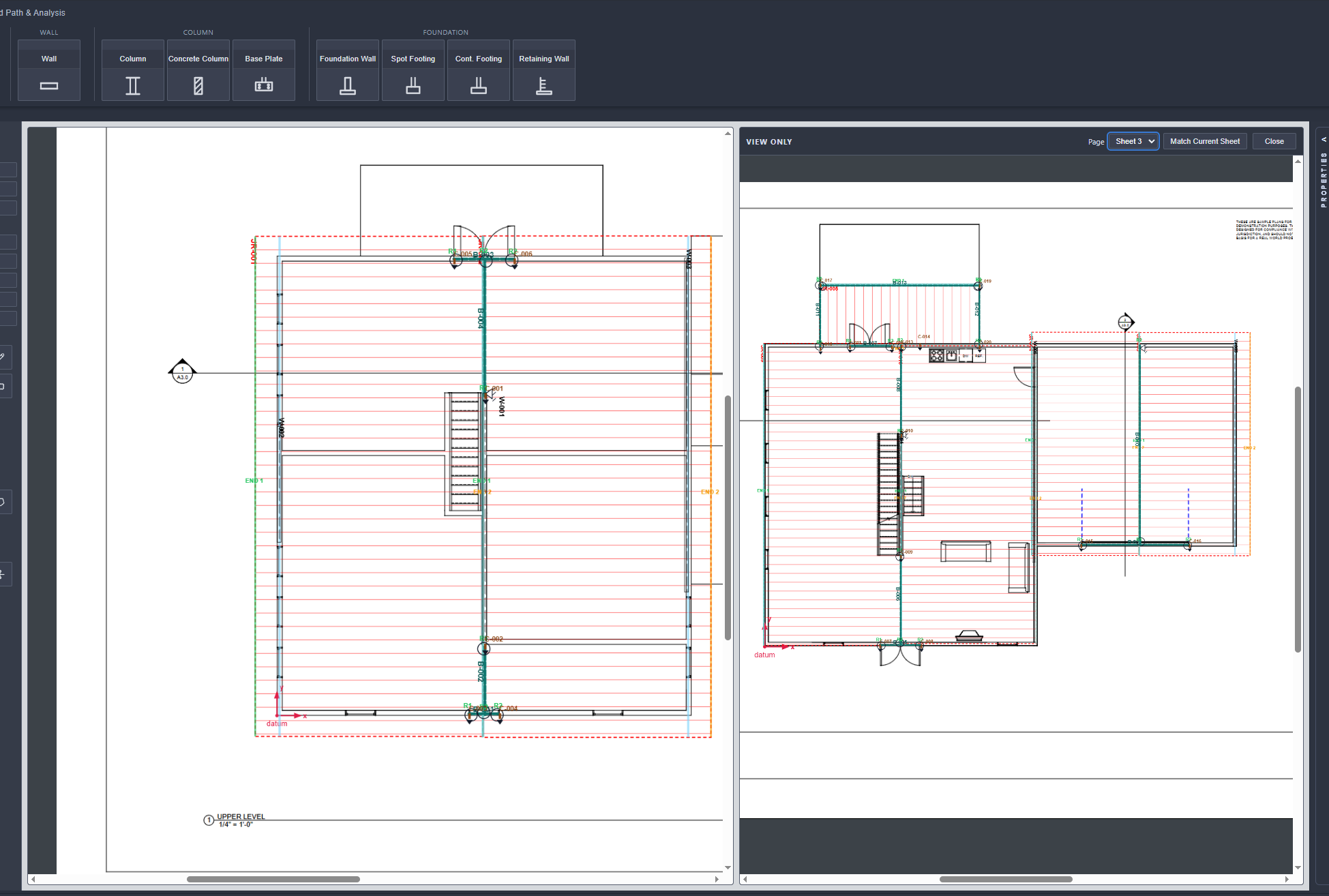
Cont. FootingDrag-to-create for strip footings under walls
PierClick to place square/round pier with rebar config
Foundation WallDrag-to-create; supports CMU, concrete, ICF
Anchor BoltCtrl+AClick to place with diameter, length, spacing config
Quick MeasureCtrl+QTemporary measurement (not saved) — real-time distance
Linear MeasurePersistent dimension line with tick marks and auto-length
Polyline MeasureMulti-segment path measurement with per-segment + total
Area MeasurePolygon area calculation: SF/m² with perimeter display
Grid LinesPlace column grid lines with auto-numbered bubbles
Copy/PasteCtrl+C/VDuplicate elements with offset
Undo/RedoCtrl+Z/Y80-state history
PanMiddle mouseMiddle mouse button drag to pan the viewport
Zoom+/- or Ctrl+ScrollZoom in/out centered on cursor
Navigate Pages← →Previous/next PDF page

Connected Load Flow

StruxDraft's signature feature — automatic gravity load tracing through the entire structure with DL/LL/SL disaggregation at every connection.

Joists → Beams

Tributary load from joist regions automatically feeds into supporting beams as uniform or partial-span loads. Spacing and tributary width drive the load magnitude. Multiple joist regions can feed the same beam from different sides.

Walls → Beams

Load-bearing wall dead load (self-weight based on stud size, spacing, and height) feeds into beams as PLF (pounds per linear foot) direct transfer. Stacking walls accumulate loads from floors above.

Beams → Columns

R1 and R2 reactions disaggregated into DL, LL, and SL components. For multi-span beams, interior reactions (R_mid) are also tracked. Each reaction maps to the connected column or bearing wall below.

Columns → Footings

Accumulated axial loads from columns (including all stories above) feed into spot footings or piers below. The footing analysis uses the accumulated DL/LL/SL for soil bearing, punching shear, and flexure checks.

Circular Reference Detection

The load flow engine tracks visited members to prevent infinite recursion. If a circular load path is detected, it's flagged without crashing — ensuring reliable results even in complex framing configurations.

Connected Loads Panel

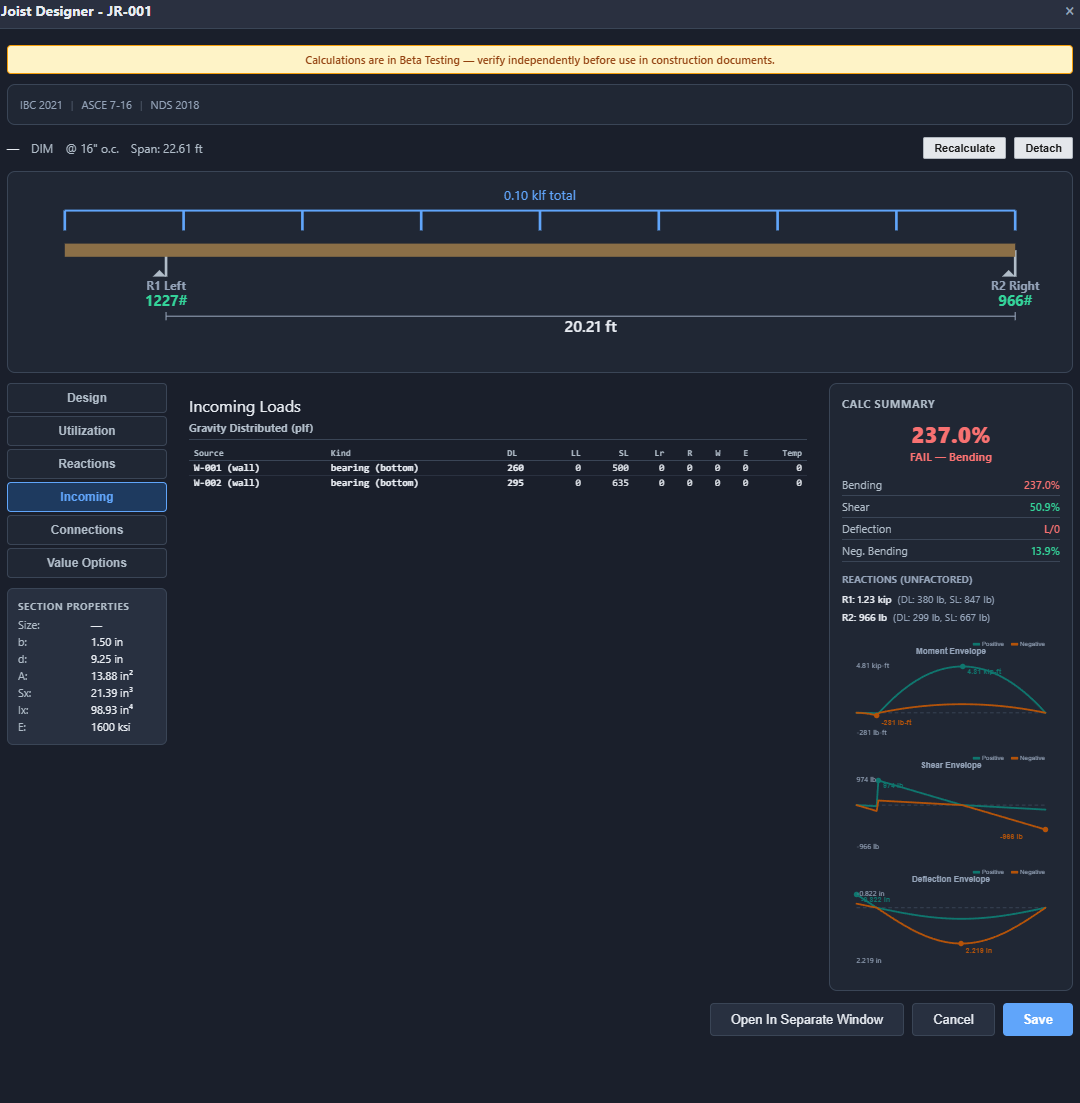
Visual SVG load diagram showing the member with all connected loads rendered graphically. A connection table lists every incoming load source, type (tributary, point, direct), and DL/LL/SL breakdown — full transparency into where every pound comes from.

Technology

Modern, lightweight desktop application — no cloud dependency, no subscription login.

Tauri v2 (Rust)

Native desktop shell using system webview. Sub-second launch, minimal memory footprint, and native OS file dialogs. Your data stays on your machine — no telemetry, no cloud sync.

React + Vite

Modern JavaScript UI with hot module replacement during development. Efficient component architecture for responsive, real-time interactions.

react-konva Canvas

High-performance 2D canvas engine for drawing structural elements, annotations, and schedule tables. Hardware-accelerated rendering for smooth panning and zooming on large plan sets.

react-pdf

PDF.js-powered rendering for construction document display. Each page independently rendered at the current zoom level for crisp plan sheets. PDF layer (OCG) detection for smart architectural stripping.

Pure Calc Engine

The calculation core is pure JavaScript with zero UI dependencies — fully testable, auditable, and portable. Hundreds of unit tests verify engineering calculations against textbook results.

Offline-First

No internet required. No cloud accounts. No usage tracking. StruxDraft runs entirely on your desktop with no external dependencies after installation.

See It in Action

Walk through a complete structural design workflow with our step-by-step tutorial.

View Tutorial