P-1.0Products
Three tools. One engine.
StruxDraft drafts and checks the structure on your plans. StruxCheck is the calculation studio on the same engine. Strux4D lets you inspect the load path in 3D — and its free web viewer runs in your browser, no install.
P-2.0Schedule of products
Which tool does what.
ONE ENGINE · ONE FILE FORMAT
| Capability | StruxDraft | StruxCheck | Strux4D |
|---|---|---|---|
| Draft on imported PDF plans, to scale | Included | Not included | Not included |
| Member design checks — NDS · AISC · ACI · TMS | Included | Included | Not included |
| Automatic load transfer between members | Included | Not included | Not included |
| Live schedules on the sheet | Included | Not included | Not included |
| Calc report package with equations & code references | Included | Included | Not included |
| Drafting markups · PDF & DXF export | Included | Not included | Not included |
| AutoFrame automatic framing (BETA) | Included | Not included | Not included |
| 3D model · load arrows · utilization heatmap | Not included | Not included | Included |
| Load-path trace · gap & column-stacking detection | Not included | Not included | Included |
| Section view at true elevations | Not included | Not included | Included |
| StruxDraft project file | Creates & edits | Not included | Reads (read-only) |
| Platform | Windows desktop | Windows desktop | Windows desktop + free web viewer |
| System requirements | Windows 10/11 · x64 | Windows 10/11 · x64 | Any modern browser |
| All three run the same calculation engine. Code editions — NDS 2015/2018/2024 · AISC 360-10/16/22 · ACI 318-14/19/25 · TMS 402-13/16/22 · SDPWS 2015/2021 · ASCE 7-22 · IBC — are selectable per project. | |||
P-3.0SD-01 · The flagship
StruxDraft
Import the architect's plans, draw the structure over them, and every member is checked the moment you place or change it. The plans, the members, the loads, and the checks live in one project file.
IMPORT
Drop in the PDF plan set and scale it once off a known dimension.
DRAW
Place joists, beams, walls — most connections happen automatically as you draw.
CONNECT
T-Connect drags a rectangle over intersections; loads quick-apply from the database.
VALIDATE
Load arrows and the utilization heatmap in 3D — hover any member for its numbers.
EXPORT
Calc report, key plans, and drafting markups — PDF or DXF.
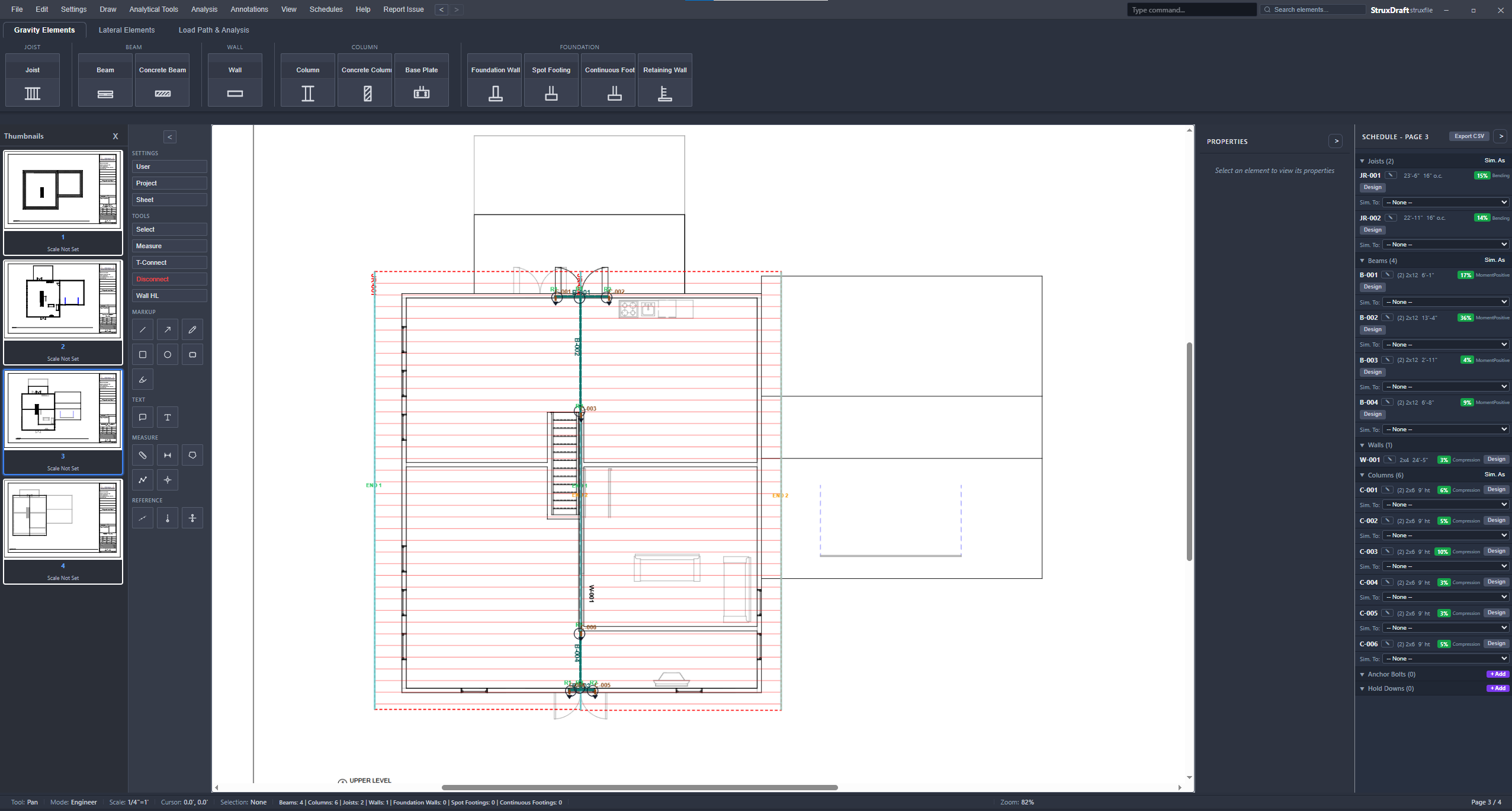
The plan is the model.
There is no separate analysis file to keep in sync. Members are drawn at true scale on the sheet, loads transfer where members touch, and the schedule fills itself row by row. Change a section and every downstream check re-runs — reactions, the members that carry them, and the schedule chip colors.
- Connected load flow — joists load beams by tributary width, walls transfer plf, beams drop R1/R2 reactions onto columns with DL/LL/SL kept separate, and columns accumulate axial down to footings. Circular references are detected and flagged.
- Live schedules — every member lands in its schedule row with size, spacing, span, and a utilization chip; the same table drops onto a sheet as a drafting table or exports to CSV.
- Drafting on the same sheets — measure, annotate, cloud, and call out sections next to the members they reference; markups print with the package.
- NDS · AISC 360 · ACI 318 · TMS 402 · ASCE 7 — editions selectable per project
All 13 member types — wood · steel · concrete · masonry — each with its own full designer dialog.
Wood runs DIM, GLB, LVL, PSL, and TJI sections with species and grade from the NDS supplement; steel takes W-shapes and HSS with full section tables; concrete and masonry members take f′c, f′m, and reinforcement layout. Section, connector, and load-combination databases are CSV-backed with a user-override layer.
Every designer documented in full
The package prints itself.
One dialog assembles the submittal — cover sheet, design criteria, load-path narrative, calculation audit, PE certification page, then member-by-member calc sheets with their equations and code references. Plans export alongside it as marked-up PDF sheets or DXF.
P-4.0SC-02 · Standalone
StruxCheck
The calculation studio — StruxDraft’s checking engine without the plan set. Open it for a proposal-stage size, a field question, or an independent check of a drafted design — one member at a time, every step of the work shown.

Open, size, print.
Every calculation shows its work the way a hand calc does: design values, adjustment factors, equations, intermediate results, and the code citation for each check. Nothing is summarized away.
- Wood — NDS ASD with the full adjustment chain: CD, CM, Ct, CL, CF, Ci, Cr, Cp.
- Steel — AISC 360 flexure with Cb, shear, and axial compression with Euler buckling, LRFD or ASD.
- Concrete & masonry — ACI 318 footing and wall checks; TMS 402 foundation walls.
- Calc sets — save and reload groups of members; print any of them as individual calc sheets.
Sign in · Beta access · Runs in your browser
Failed attempts print too, so the sizing decision is on the record.
P-5.0AF-03 · Beta
AutoFrame BETA
Give it the wall layout and it frames the level — then every member it places runs through the same checks as one you drew by hand. Ships inside StruxDraft; no extra license.
AutoFrame builds a graph from your walls with adaptive endpoint clustering, extracts each room as a planar face — rectangular or not — and runs joists perpendicular to the short dimension. Where a span exceeds its limit it subdivides with a beam; where a wall has an opening it places a header.
Sizing is iterative: each generated member steps through candidate sections until the NDS checks pass, using the same engine as the designers above. Any room can be overridden — its live load, its room type, or the whole framing layout by hand. It's in beta: review what it draws the way you'd review a junior engineer's framing plan.
P-6.0S4-04 · Validation
Strux4D
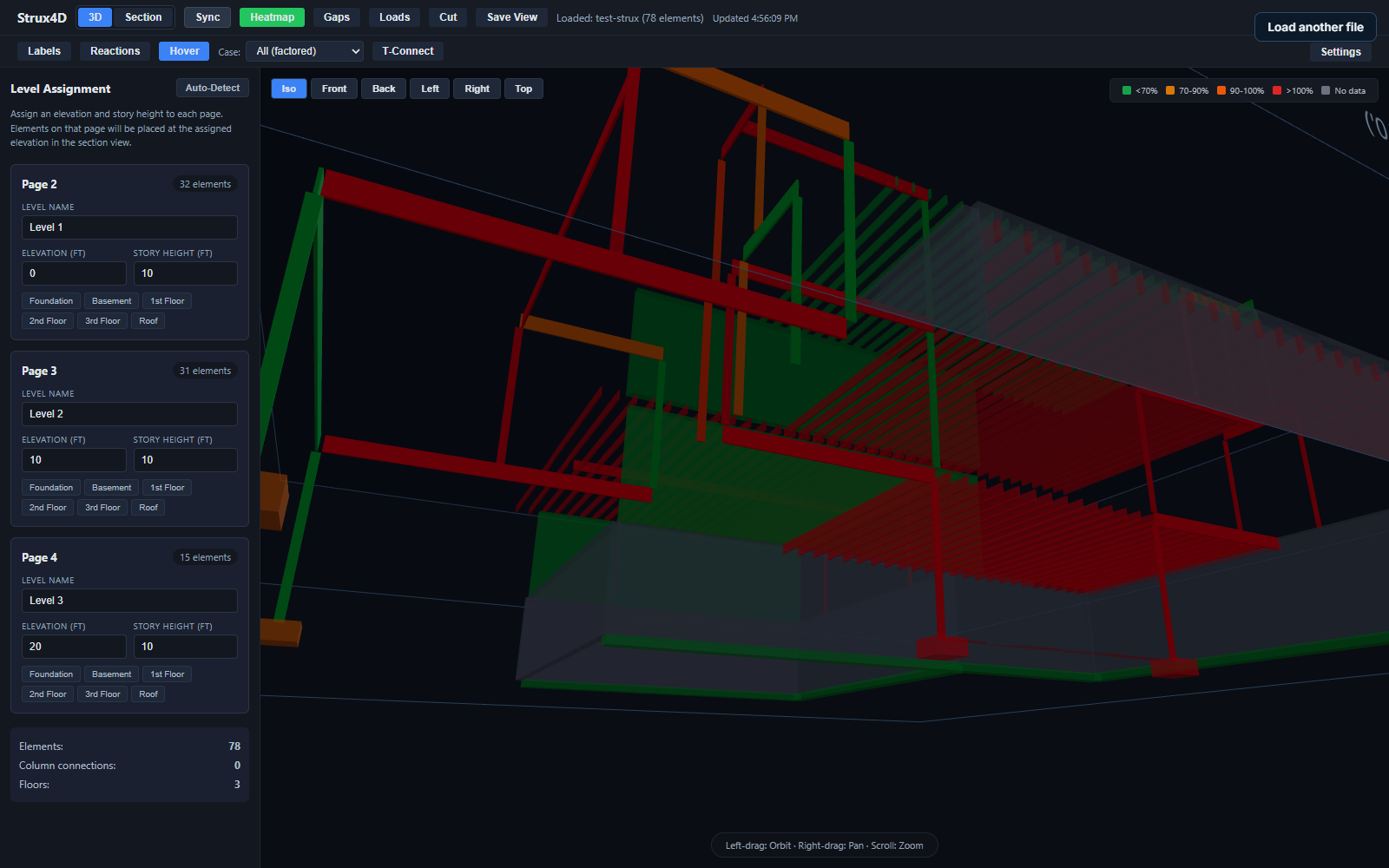
The hardest part of multi-story design isn't the math — it's making sure every load has a path to the ground. Strux4D assembles your plan sheets into a 3D model and walks that path with you. It ships on the desktop with the suite, and the free web viewer runs in any browser.
Try it right now — it opens the real test-strux model in your browser.
No install, no account. The viewer loads the same 78-element project shown across this page: assign each plan page an elevation and the floors stack into a model you can orbit, section, and question. Open a project file of your own with "Load another file."
FREE · READ-ONLY · OPENS STRUXDRAFT PROJECT FILES
A plugin to carry the framing you design in StruxDraft into your Revit model — members, levels, and tags coming across instead of being redrawn. In development now; beta participants will see it first.
P-7.0Next step
Put a real project through it.
Bring your plans to the beta. Every check shows its equation.
SUBSCRIPTION LICENSING · ONE LICENSE RUNS ON TWO MACHINES · PUBLIC BETA